Every WhatsApp chat becomes a customer you can track.
WhatDeck puts your WhatsApp number in one shared inbox, sorts each chat into a sales stage, follows up for you, and tells Meta which ads brought real buyers.
Works with the WhatsApp number you already use. Built in Dubai for UAE businesses, in English and Arabic.
What happens to a message
Four things happen to every chat, without anyone on your team lifting a finger.
- 1
It lands in one inbox
Your whole team answers from one place. Each chat has an owner, so nobody replies twice and nobody is forgotten.
- 2
It gets a stage
WhatDeck reads the chat and moves it through your own stages, from new enquiry to paid, in English or Arabic.
- 3
It gets a follow up
Quiet leads get a reminder at the time you set. Outside working hours your AI agent answers from your own FAQs.
- 4
Meta hears the result
Each stage goes back to Meta as a signal, so your ads chase people who buy and stop paying for people who only ask.
One place for sales, support and your store
A pipeline that fills itself
Leads, deals and tasks live next to the chat. You see who is waiting, what each deal is worth and what is due today.
- Your own stages and words for your industry
- Round robin or manual assignment for your team
- Deals with amounts, payment links and tasks
- Reports on your pipeline and team
Ads that learn from real sales
Click to WhatsApp ads usually stop at the click. WhatDeck sends each lead stage back to Meta through the Conversions API, on both WhatsApp connection types.
- Lead, qualified and purchase signals
- Works with click to WhatsApp ads
- See which ad each chat came from
Your Shopify store, on WhatsApp
Connect your store and buyers get order updates in the chat they already use. Cash on delivery orders get confirmed before you ship.
- Order, shipped and delivered messages
- Cash on delivery and address confirmation
- Abandoned cart reminders
- Every order on the customer record
An AI agent that knows your business
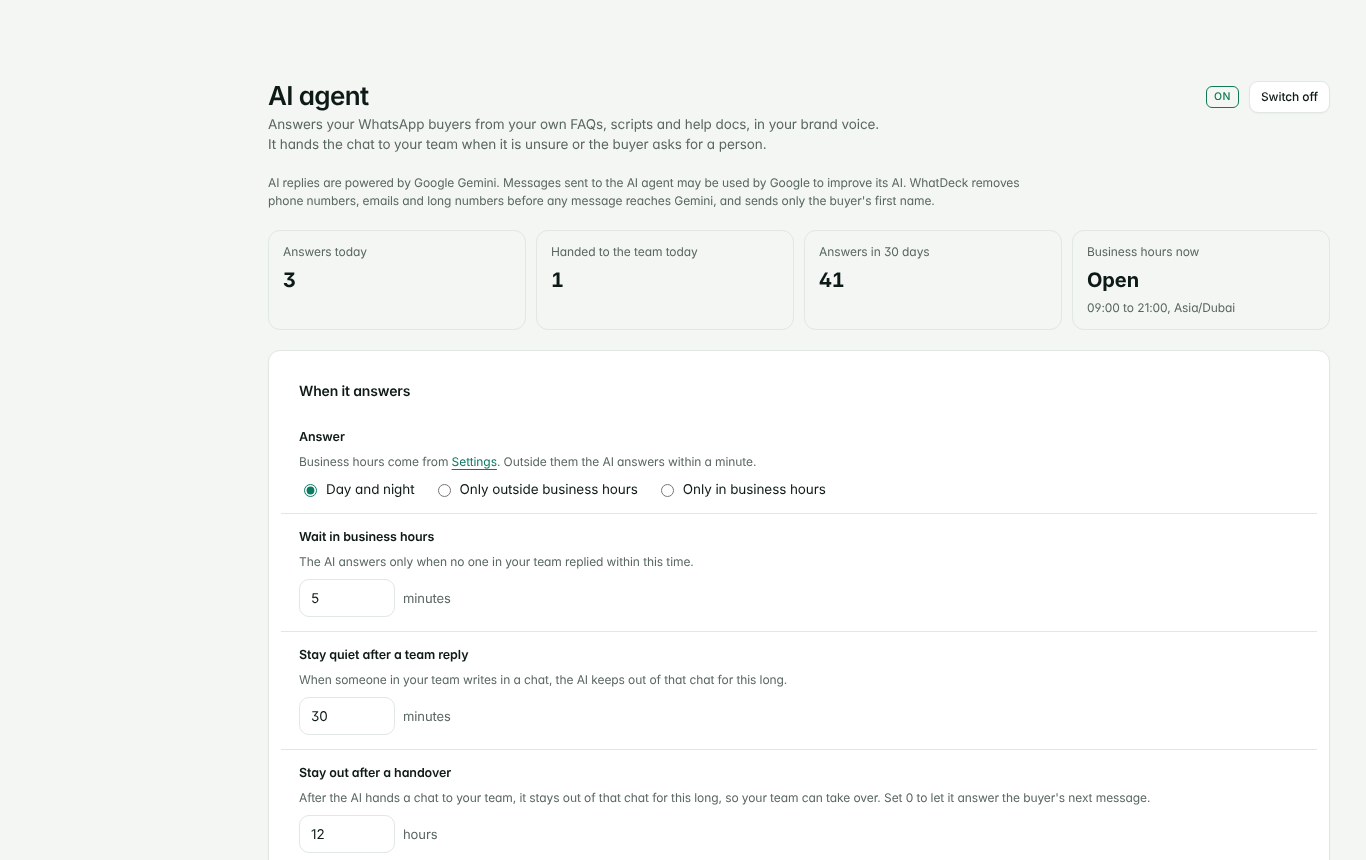
Upload your FAQs, support scripts and brand voice. The agent answers buyers day or night from that knowledge only, and hands the chat to your team when it is unsure.
- You choose when it answers and how it sounds
- Never makes up a price, stock level or delivery date
- Hands over on a voice note, a complaint or a request for a person
- Try it inside WhatDeck before you switch it on
Bring buyers back
Send campaigns to the right group, ask happy buyers for a Google review, and track which link or QR code started each chat.
- Contact import, groups and segments
- Campaigns with careful sending limits
- Google review requests
- Chat links and QR codes for print and social
- Google Sheets and webhooks for your other tools
Two ways to connect your number
Start with the quick one and move to the official one when you are ready. WhatDeck works the same on both.
| Scan a QR code | Official WhatsApp Cloud | |
|---|---|---|
| Setup | Scan once from your phone, like WhatsApp Web | Your Meta business account and an approved number |
| Your phone | Keeps working as it does today | The number moves to the Cloud |
| Messages you start | Sent at a careful pace | Sent as approved templates, billed by Meta |
| Best for | Getting started this week | Higher volume and campaigns |
Everything in WhatDeck
Every account gets every feature. Nothing is locked behind a higher plan.
Inbox and team
- Shared WhatsApp inbox
- One owner per chat
- Round robin or manual assignment
- Waiting and unassigned alerts
- Away replies outside working hours
- English and Arabic
Sales
- Automatic lead stages
- Your own stages and industry words
- Deals, amounts and payment links
- Tasks with due alerts
- Timed follow ups
- Reports on pipeline and team
Store
- Shopify orders and carts
- Order, shipped and delivered messages
- Cash on delivery confirmation
- Address confirmation
- Abandoned cart reminders
- Customer spend and order history
Growth and tools
- AI agent trained on your documents
- Keyword chat flows
- Campaigns, groups and segments
- Google review requests
- Chat links and QR codes
- Meta Conversions API signals
- Google Sheets and webhooks
Inside the product
The AI agent page, where you add your knowledge, set the hours and try an answer before buyers see it.
Questions
Do I need a new WhatsApp number?
No. You connect the number your customers already know, either by scanning a QR code or through the official WhatsApp Cloud.
Is the QR connection official?
No. It links WhatDeck to your number the way WhatsApp Web does, and WhatsApp does not support that for automation. WhatDeck sends at a careful pace to protect your number, and the official Cloud connection is there when you want it.
Who sees my customers' chats?
Your team, inside your own WhatDeck account. Each business has its own separate account. If you switch on the AI agent, messages it answers go to Google Gemini with phone numbers, emails and long numbers removed first, and Google may use them to improve its AI.
Can my team use it on their phones?
Yes. WhatDeck is built to work in the phone browser, so your team can answer and update deals from anywhere.
How do I cancel or delete my data?
Write to whatdecksupport@gmail.com from your account email. We close the account and delete its data within 30 days.
Which industries is it for?
Online stores, showrooms, clinics, real estate teams and any business that sells or supports over WhatsApp. You pick your business type and WhatDeck uses the right words and stages.
Put your WhatsApp to work this week
Fill in one short form with your business and your number. We set up your account and send your login.
Start with your number